
 Deutsch
  English
A Practical Approach to Modernizing P&IDs Workflows
Why P&IDs Remain the Core of Plant Operations
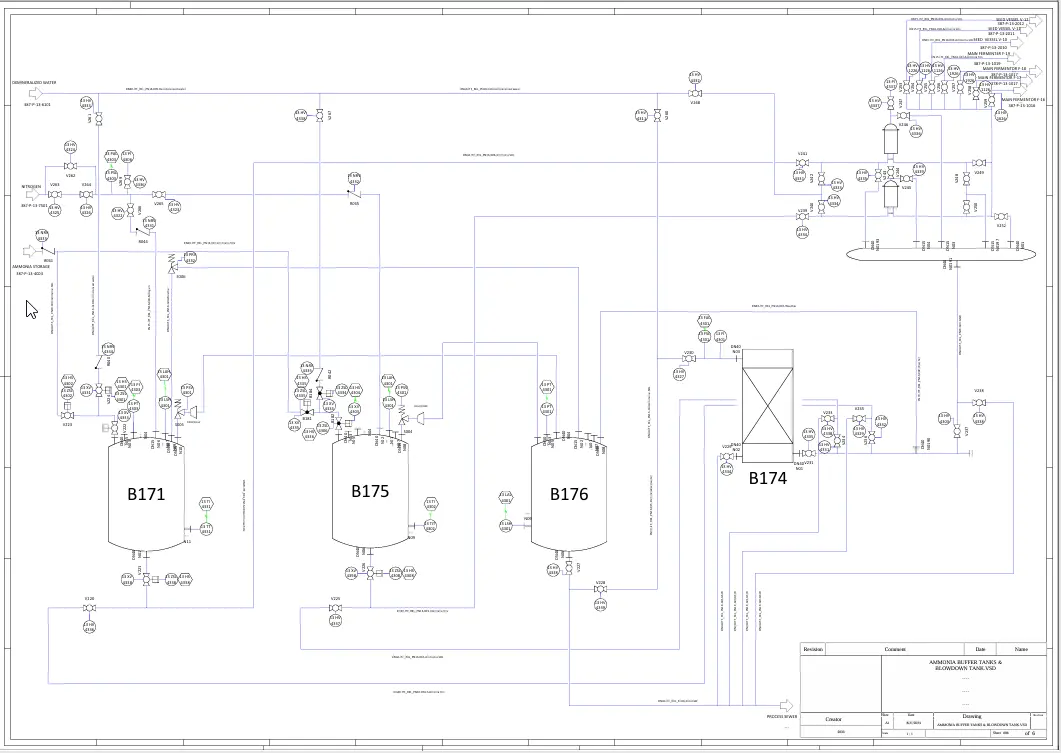
In every process plant, Piping & Instrumentation Diagrams (P&IDs) remain one of the most critical engineering documents throughout the entire lifecycle of the facility. They provide a detailed representation of process equipment, piping systems, control loops, and instrumentation required to operate the plant safely and efficiently.
Maintenance teams rely on P&IDs to locate equipment, engineers use them to evaluate process changes, and operators depend on them for troubleshooting and safe operation. When documentation is accurate and up to date, plants run smoother, safer, and with fewer unexpected shutdowns.
However, for many plant owners and operators, keeping P&IDs current is a continuous challenge.
The Reality: P&IDs Are Always Changing
Even experienced engineers and designers can fall prey to subtle but impactful errors in P&IDs. Here are a few of the most frequent:.
Industrial facilities are never static. Over time, pumps are replaced, new instruments are added, pipelines are rerouted, and control strategies are updated. Every modification should be reflected in the P&ID to ensure the diagram matches the real plant configuration.
In practice, this rarely happens perfectly.
Many facilities operate with a mix of legacy drawings stored as PDFs, DWG files, scanned documents, or vendor diagrams created using different standards. When these drawings are not updated consistently, the gap between documentation and reality grows.
This situation can lead to:
- Incorrect maintenance planning
- Safety risks during shutdowns
- Delays in revamp projects
- Inefficient troubleshooting
Since P&IDs serve as the blueprint of the plant, even small errors can cause costly consequences.
The Mistake Many Plants Make When Digitizing P&IDs
When organizations decide to modernize their engineering documentation, they often assume everything must be converted at once.
Typical expectations include:
- Converting all legacy diagrams before using new software
- Standardizing every symbol immediately
- Structuring all tag data from day one
- Implementing a full digital engineering system at once
This approach usually slows the project down. Large conversion efforts require time, budget, and resources, and many initiatives stop before delivering real value.
In reality, P&ID improvement does not need to start with perfection.
Start Small Instead of Waiting for the Perfect Moment
A more practical strategy is to begin with a limited scope and expand gradually. Plant owners do not need hundreds of diagrams converted to see benefits. Even a small number of updated P&IDs can improve daily operations.
A realistic starting point could be:
- One plant area
- One production line
- One system diagram
- A small set of critical P&IDs
Once the team begins using structured and editable diagrams, improvements happen naturally during normal engineering work.
This incremental approach allows plants to:
- Deliver value early
- Reduce risk
- Control costs
- Keep change manageable
Improving P&IDs Step by Step During Real Work
The most effective way to modernize P&IDs is to improve them during real plant activities instead of running a large one-time conversion project.
Each time a change occurs, the diagram can be refined by:
- Updating equipment tags
- Aligning symbols with standards
- Adding missing instrument data
- Clarifying piping connections
- Structuring line information
Over time, the quality of documentation increases without interrupting plant operations.
This approach reflects how most plants work — updates happen when modifications happen.
Why P&IDs Are the Best Starting Point for Digital Engineering
For many owner-operators, P&IDs are often the only engineering documents that are regularly used after commissioning.
Unlike complex 3D models, P&IDs are:
- Easier to maintain
- Widely understood across teams
- Required for safety reviews
- Used in maintenance and operations
- Needed for revamp projects
Because of this, P&IDs are a natural first step when moving toward digital engineering workflows.
Modern intelligent P&IDs can also connect to other systems such as:
- Asset management
- 3D design models
- Electrical diagrams
- Maintenance databases
This makes them a strong foundation for future digitalization.
Avoiding the “All-or-Nothing” Trap
Many modernization projects fail because they try to solve everything at once. Instead of asking:
How do we convert everything?
A better question is:
Where can we start to get value quickly?
Successful projects usually follow these principles:
- Start with existing drawings
- Improve diagrams gradually
- Standardize over time
- Expand only when ready
- Focus on usability, not perfection
This keeps the project practical and sustainable.
Building a Long-Term P&ID Strategy for Owner-Operators
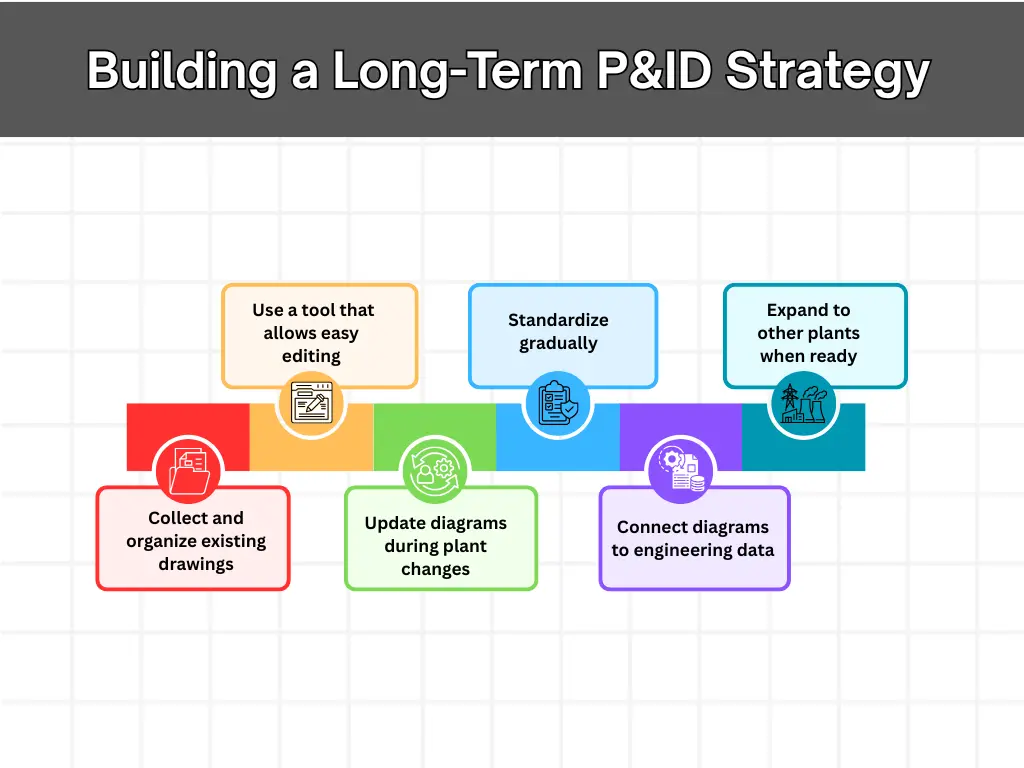
A realistic P&ID improvement roadmap often looks like this:
Step 1 — Collect and organize existing drawings
Gather PDFs, DWGs, and vendor diagrams in one place.
Step 2 — Use a tool that allows easy editing
Choose software that lets engineers update diagrams without complex CAD skills.
Step 3 — Update diagrams during plant changes
Modify P&IDs whenever equipment or piping changes.
Step 4 — Standardize gradually
Apply symbol libraries, tagging rules, and naming conventions step by step.
Step 5 — Connect diagrams to engineering data
Link P&IDs with equipment lists, instrumentation data, and project documentation.
Step 6 — Expand to other plants when ready
Once the workflow works in one plant, scaling becomes easier.
This path keeps the workload manageable while still moving toward modern engineering practices.
Conclusion
Modernizing P&IDs does not have to start with a large-scale conversion project. Plant owners and operators can achieve better accuracy and efficiency by updating diagrams step by step during real engineering work. A gradual approach reduces risk, keeps costs under control, and ensures that documentation always reflects the actual plant configuration.
Using flexible tools like Visio P&ID Process Designer makes this process easier by allowing teams to create and maintain intelligent, standards-compliant P&IDs directly inside Microsoft Visio®. With object-oriented functionality and ready-to-use symbol libraries, plants can start small, improve drawings over time, and build a reliable foundation for future digital engineering workflows.